Diagnostics for spacecraft operations
Find the signalsothers miss.
Detect subtle behaviour changes, understand what they mean, and trace every conclusion back to your mission's own documentation.
Telemetry: ESA Anomaly Dataset (ESA/ESOC, Airbus DS, KP Labs), CC BY 4.0.
Detect subtle change
Deviations from a spacecraft's own patterns, not from a fixed threshold.
Explain with sources
Every statement cited back to the passage it came from.
Learns from your operators' verdicts
Each verdict on an alert teaches the detector. A person closes every alert.
Self-hostable
Runs entirely on your own infrastructure, air-gapped if required.
 The brochure How it works, in a 6-minute read Learn more by reading our brochure. Get the PDF
 Product tour The product, screen by screen The real product, step by step. About four minutes. Take the tour
From anomalyto understanding.
Most monitoring stops at raising a flag. TupleTrace continues: it correlates the affected parameters, retrieves the relevant passages from your mission's own documentation, and returns a written account of what is likely happening and why.
Every statement carries a citation back to the section it came from, so the reasoning can be checked rather than trusted.
It is advisory by design. TupleTrace gives the flight control team an explanation and a place to start. It never commands the spacecraft.
Detection you can audit.Diagnosis you can read.
Why PRS-001 alerted high grounding: full
The flagged interval for PRS-001 may indicate a pressure rise correlated with temperature, as evidenced by the strong positive correlation with TMP-001 (r=+1.000) and HTR-001-DC (r=+0.951)[1][2], consistent with[3]. This mode is more consistent with the observed evidence than pressure rise without temperature change[4], which lacks the temperature correlation seen here. The minimum value (3.3308) is 0.28 above the nominal library minimum (3.0508)[5], aligning with a sustained level shift but not a narrowing thermostat swing[6]. A similar past event (evt-2026-06-19-prs001-a) was closed as 'nominal'[7], suggesting this may not represent a novel anomaly. The next confirming check should verify TMP-001 sensor integrity and heater control duty cycle trends[8].
- 1 Correlation: TMP-001 correlates with PRS-001 at r=+1.000 over the flagged interval (n=30)
- 2 Correlation: HTR-001-DC correlates with PRS-001 at r=+0.951 over the flagged interval (n=30)
- 3 Procedure: Propulsion Tank 1 › Pressure rise correlated with temperature
- 4 Procedure: Propulsion Tank 1 › Pressure rise without temperature change
- 5 Measured: min is constant at 3.0508 across the nominal library (n=40); this interval observed 3.3308, a delta of +0.2800
- 6 Procedure: Thermal Subsystem FDIR › Narrowing thermostat swing
- 7 History: similar past event evt-2026-06-19-prs001-a (distance 0.3025) was closed as 'nominal'
- 8 Procedure: Heater Control Loop › Duty cycle elevated with rising temperature
Learns from youroperators' verdicts.
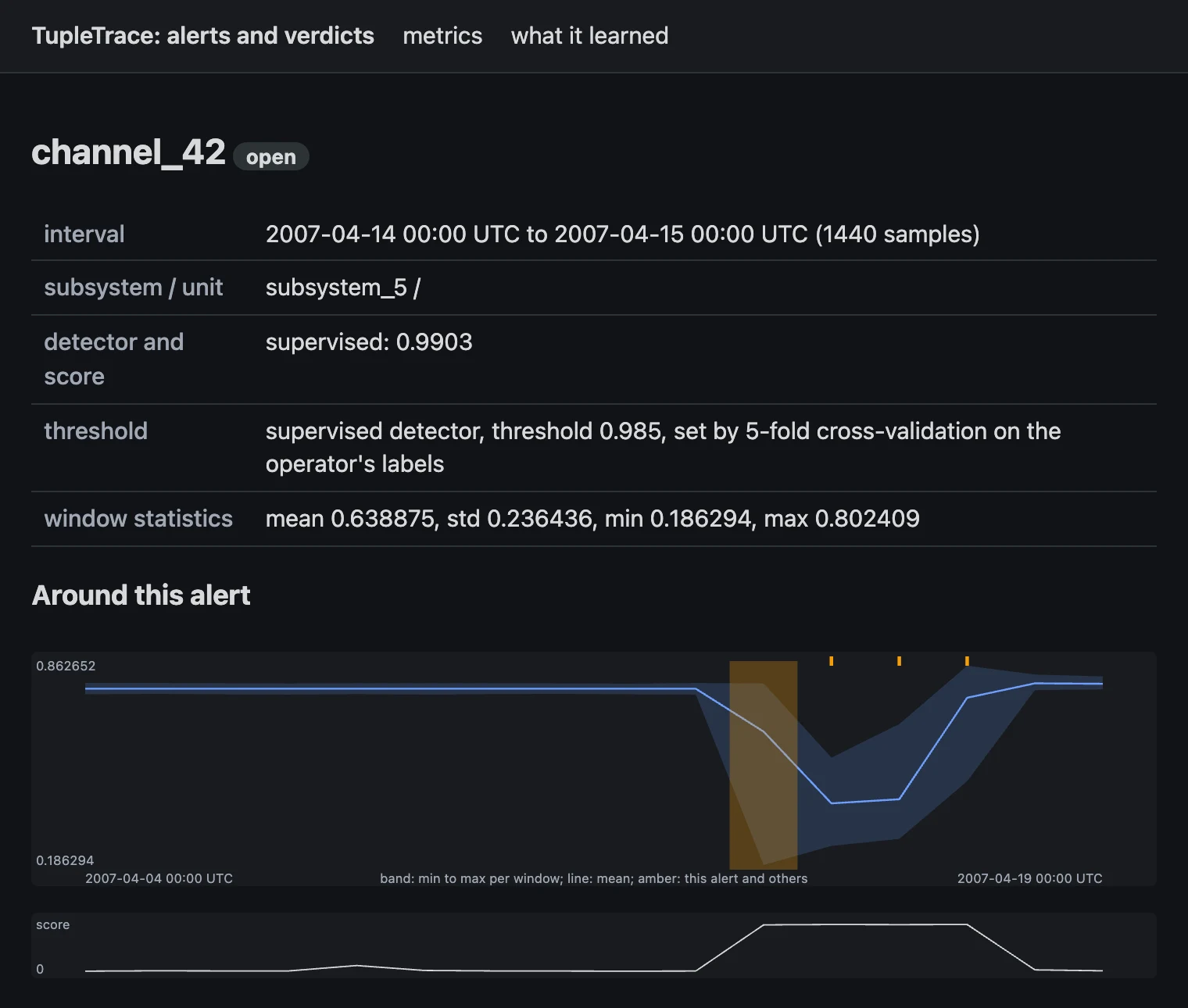
It starts without labels. Every alert asks your operator for a verdict. Mark it nominal and that behaviour stops alerting. Mark it an anomaly and it becomes a training label.
Once your operators have confirmed enough anomalies on a parameter, a detector trained on their labels takes over for that parameter. It picks up new verdicts at its next update.
A person closes every alert. Nothing is closed or suppressed without one.
Telemetry: ESA Anomaly Dataset (ESA/ESOC, Airbus DS, KP Labs), CC BY 4.0.
Where to start
Which one are you?
You run satellites
Limits catch what they were set for, and alarm on plenty that doesn't matter. Your operators already know which alarms are false. Your tools don't learn it.
Start with a no-cost run on your own telemetry.
You build ground segments
Your customers want fewer false alarms and alerts they can check. You need something you can put in front of them.
Run a joint pilot with one of your operator customers.
First, a no-cost run
Two CSV exports from one spacecraft: a normal period, and the window you want looked at. Three columns: parameter, timestamp, value.
We show you what we found, and how it differs from what your monitoring flagged. It can run on your side. No cost, nothing signed.
Then, if it is worth it, a pilot
One mission, one subsystem, a window of your historical telemetry. Four to six weeks. Your existing monitoring keeps running untouched.
You get the system running in your environment, a findings report with the evidence behind each finding, and a review session with whoever you want in the room.
The findings report is yours to keep, whether or not you continue. We keep our software and methods. Your telemetry stays on your site: we install and work inside your environment.
What it is not
- Our ground product is not flight software and not a mission-control system. It runs beside the one you have.
- It never sends commands to the spacecraft. It reads telemetry only.
- Nothing is closed or suppressed without a person.
- Your existing limit checks keep running. It adds to them, it does not replace them.
For your security review
- Runs on your premises, on a single node.
- Installs air-gapped from one bundle. One command checks the whole install.
- Explanations are written on your site too: by default with no language model, or with an open model on your own hardware.
- Your telemetry, procedures and FDIR documents stay on your premises. The product makes no outbound connections.
Built for demanding environments
Built for real missions.
Designed for agencies and commercial operators, including those with sovereignty or air-gap requirements.
Single missions to fleets
Starts with one spacecraft and grows with the operator.
Integrates, not replaces
Works with the control systems and documentation you already have.
Self-hostable and sovereign
Every dependency OSI-licensed. Nothing has to leave your network.
Get in touch
Contact TupleTrace
We are working with a small number of early missions. If your team operates spacecraft and this sounds relevant, we would like to hear from you.
Here is our brochure (PDF, 10 pages)
If you have any questions or would like a chat, reach out through the form below.